"Fred from Fireflies" joins your call, records the conversation, and sends everyone a summary afterward. Convenient, until you start wondering where that recording goes and who can see it.
So I read Fireflies' current privacy policy, terms of service, and security page. Fireflies has changed a fair amount since I last covered it, adding a real bot-free capture option and a formal Zero Data Retention commitment for meeting content. Some of the older concerns about broad data collection and sharing still hold up. Here's what's actually true today, sourced from Fireflies' own documents.
What Is Fireflies AI Today?
Fireflies is a cloud meeting assistant that has traditionally worked by sending the "Fireflies.ai Notetaker" bot into your Zoom, Google Meet, or Microsoft Teams call to record, transcribe, and summarize it. That's still the default experience for most users.
Two things changed this year. Fireflies now offers a Google Meet SDK integration that records natively without a visible bot (a consent banner appears instead), and a desktop "Take Notes" mode that captures system audio with no bot at all. Both drop features (no speaker labels, no Sales Assist, and the SDK path needs a participant to approve first); the bot is still the only path to the full feature set, including CRM sync and Live Assist.
Everything you record, whether through the bot or the bot-free paths, is still processed on Fireflies' servers, not your device.
What Fireflies Actually Collects
Fireflies' privacy policy (last updated March 6, 2026) is broader than most people expect from a note-taking tool:
From meetings: audio and visual recordings, transcripts, summaries, participant names and emails, meeting titles and URLs.
From your account: name, company, email, phone number, physical address, and payment details.
Automatically: IP address, browser and device data, usage logs, and approximate location inferred from your IP.
From integrations: if you connect Google Calendar, Slack, or similar tools, Fireflies can access "any content that you have provided to and stored in your Third-Party Account", including contacts and calendar data, depending on the integration you enable.
Fireflies also discloses personal information to categories of third parties, per its state-privacy-law disclosures: vendors and service providers, integration partners, corporate affiliates, law enforcement when legally required, professional advisors, and parties involved in a corporate transaction such as an acquisition.
None of this is unusual for a cloud SaaS product. It's the same broad collection pattern most bot-based transcription tools use, since the bot needs calendar and platform access to function.
What Fireflies Has Fixed
The most significant change since this was last written: Fireflies now states plainly that it does not use personal information to train AI models, and contractually prohibits its vendors from doing so with your data either. Its terms of service go further, stating Fireflies "will not use your User Content to train, retrain, fine-tune or otherwise improve any generative artificial intelligence models".
For meeting content specifically, Fireflies applies what it calls a Zero Data Retention policy: audio, video, transcripts, and summaries are not stored by any third-party vendor after processing, not accessed by a vendor once the service completes, and not used for training. Account-level personal information (your name, email, billing info) follows a separate rule: it's kept while your account is active and deleted within 30 days of account closure.
Fireflies also holds SOC 2 Type II, GDPR, and HIPAA certifications (HIPAA specifically as an Enterprise-plan add-on, more on that below), runs a public bug bounty program, and offers meeting-level sharing controls, including a "Only Owner" setting that restricts a recap to just you.
Where the Real Friction Still Is
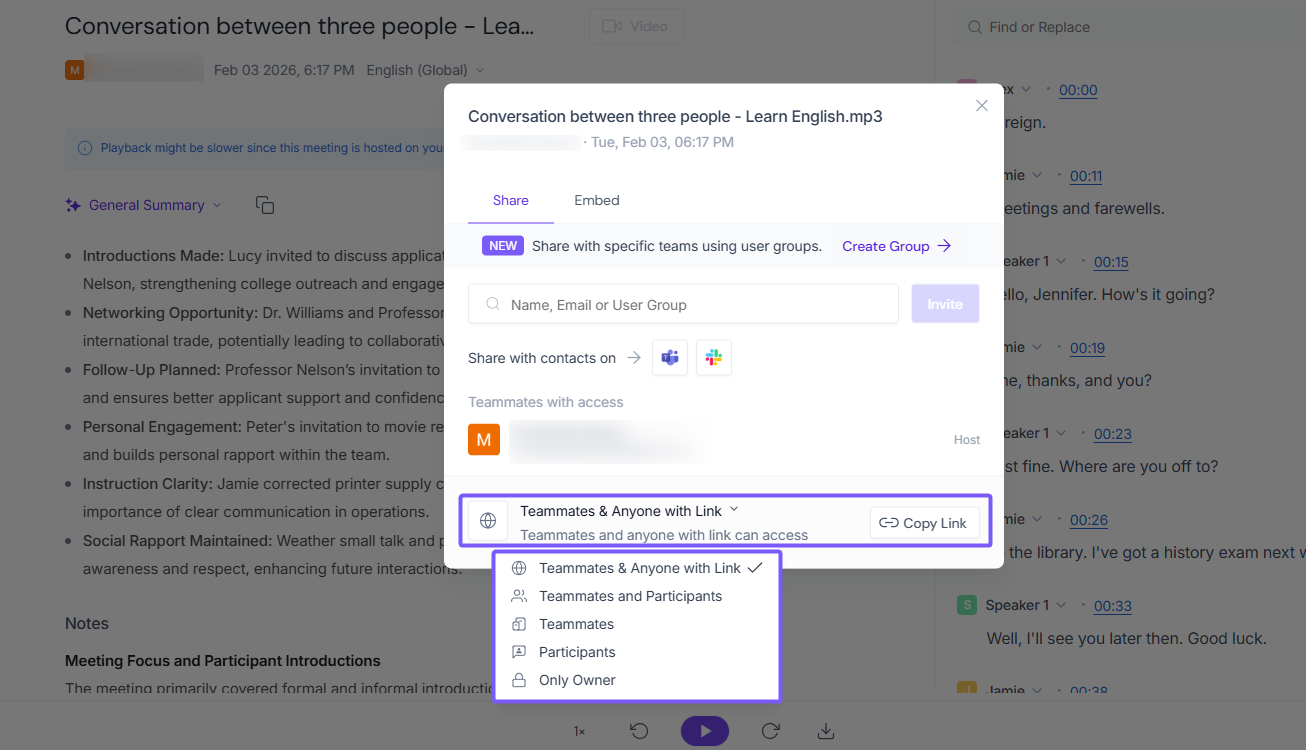
The default sharing setting is wider than most people expect. Out of the box, new meeting recaps use "Teammates & anyone with the link": anyone in your Fireflies workspace can see the meeting under their #AllMeetings tab, even if they weren't invited, and anyone who gets forwarded the link can open it. You can tighten this per meeting or set a stricter workspace default (Only Participants, Only Teammates, or Only Owner), but you have to do it yourself.
Fireflies still grants itself a broad license to your content. Its terms give Fireflies a "nonexclusive, royalty-free, worldwide, fully paid, and sublicensable" license to your recordings and transcripts, described as perpetual and irrevocable. That license is contractually scoped to providing you the service and explicitly excludes AI training, but it's still broader than most people assume they're signing up for.
Liability is capped low. If something goes wrong, Fireflies' maximum liability is the greater of $100 or what you paid in the past six months. A leaked confidential meeting doesn't come with meaningful financial recourse.
Recording consent is still your responsibility. Fireflies' terms require every meeting participant to consent to being recorded, and that obligation sits with you, the host, not with Fireflies, even when the bot joined automatically through a calendar integration you set up once and forgot about.
HIPAA compliance requires the Enterprise plan. Fireflies' security page markets HIPAA compliance as a general badge, but its own pricing page lists HIPAA compliance, private storage, and custom data retention as Enterprise-only additions on top of Business. Free, Pro, and Business customers don't get it by default.
A recent review analysis from Unstar, based on app-store and review-site complaint patterns, flags two more Fireflies-specific friction points. Its CRM auto-logging occasionally attaches meeting notes to the wrong Salesforce or HubSpot record when email domains or attendee lists are ambiguous. And its bot can keep recording after the original host leaves a call while other attendees stay connected, an unintentional but real gap for calls that outlast the host.
The Bot-Free Option, and Its Limits
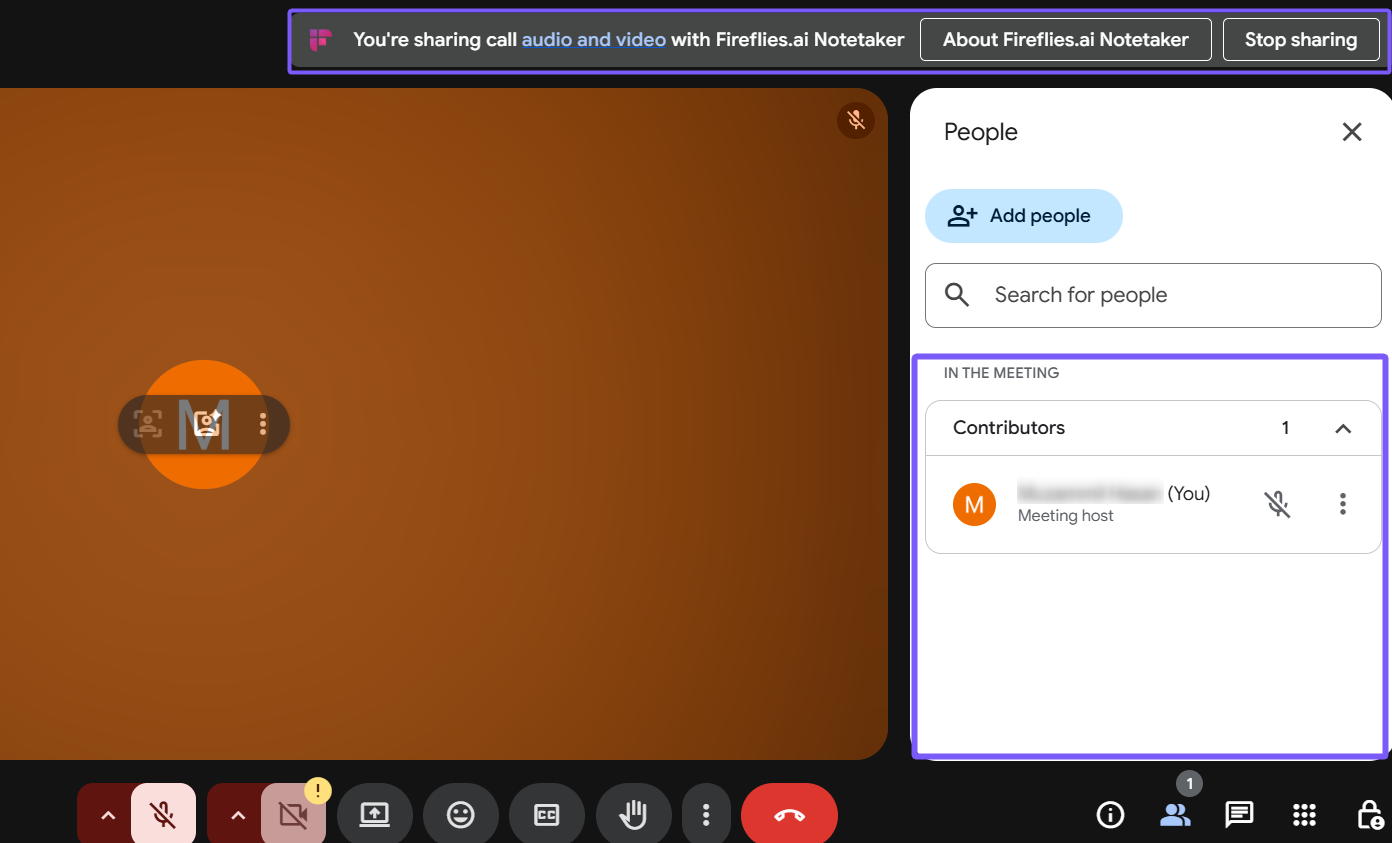
If you want to avoid a visible bot, Fireflies' Google Meet SDK integration and desktop "Take Notes" system-audio mode both work without one. The SDK path still requires one participant to explicitly approve the recording banner shown above, and any attendee can revoke it mid-call. That's a genuine improvement over always sending a bot into the meeting. It comes with tradeoffs too: no speaker labels, no Sales Assist, and, for Take Notes, no separate audio or video file, only a transcript and summary.
Should You Trust Fireflies With Sensitive Information?
Use the Enterprise plan, tighten sharing defaults, and confirm a BAA for:
- Healthcare discussions involving patient information
- Legal meetings requiring attorney-client privilege
- Financial services conversations with client data
Set your workspace default to "Only Participants" or "Only Owner" before using it for:
- Internal meetings with sensitive company information
- HR discussions, performance reviews, or job interviews
- Executive or board-level conversations
The default settings are fine for:
- Public webinars or presentations
- Non-confidential training sessions
- Casual team or social meetings
Whatever the setting, every participant still needs to consent to being recorded, and that responsibility is yours, not Fireflies'.
A Private Alternative: Anarlog
If you'd rather not route meeting content through a cloud vendor at all, local AI meeting notetakers process everything on your device instead.
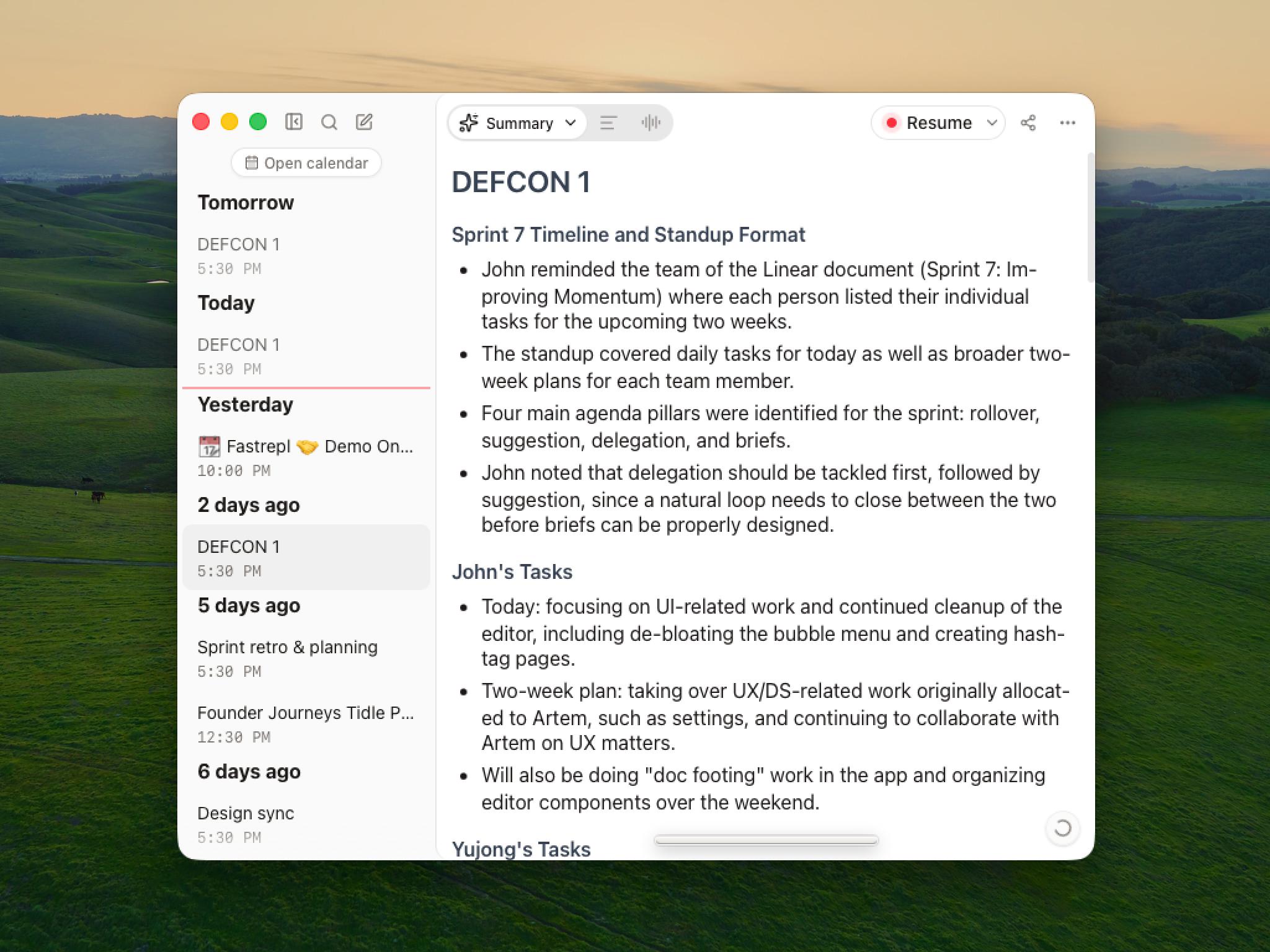
Anarlog is an open-source AI notepad for meetings that stores your canonical meeting record locally in SQLite instead of a vendor-hosted workspace. Markdown export is available when you want a portable copy. See our Fireflies AI Alternatives article for a full Anarlog-vs-Fireflies comparison.
Your choice of AI stack: managed cloud service ($15/month or $150/year), bring your own API keys, or run local models via Ollama. You choose which AI provider touches your data, not a single vendor.
Bot-free on every platform by default: Anarlog captures system audio and microphone directly on Zoom, Teams, Google Meet, phone calls, or in-person conversations, without a bot joining and without needing a separate SDK integration per platform.
You control distribution: export to Markdown, PDF, or rich text, and connect the tools you already use. No vendor-hosted recap link that defaults to being visible to your whole workspace.
What Anarlog itself collects, for the same transparency this article asks of Fireflies: pseudonymous usage and diagnostic data, device and log data, whatever content you deliberately send to optional cloud features (hosted transcription, AI, sharing, or connectors), website analytics, and payment data processed by Stripe. Meeting audio, transcripts, notes, and summaries aren't part of Anarlog's own analytics or telemetry. Read Anarlog's privacy policy for the full breakdown.
A local-only configuration reduces how much of your meeting content leaves your device, but it doesn't replace getting consent, securing your own device, or reviewing every cloud feature you turn on.
Is Fireflies AI Safe?
Safer than it looked a year ago, and more honest about it. Zero Data Retention for meeting content, no AI training on personal data, and real bot-free capture options are genuine improvements worth crediting. The parts still worth knowing before you rely on it: a broad default sharing setting, a low liability cap, a broad (if scoped) content license, and HIPAA compliance that's gated behind the Enterprise plan.
None of that makes Fireflies unsafe to use. It makes it a tool where the defaults deserve five minutes of attention before your first sensitive meeting, and where checking the current policy yourself beats taking anyone's older writeup, including this one, at face value.